
Serverless architecture encompasses
many things, and before jumping into creating serverless
applications, it is important to understand exactly what serverless
computing is, how it works, and the benefits and use cases for
serverless computing. Generally, when people think of serverless
computing, they tend to think of applications with back-ends that
run on third-party services, also described as code running on
ephemeral containers. In my experience, many businesses and people
who are new to serverless computing will consider serverless
applications to be simply “in the cloud.” While most serverless
applications are hosted in the cloud, it’s a misperception that
these applications are entirely serverless. The applications still
run on servers that are simply managed by another party. Two of the
most popular examples of this are AWS Lambda and Azure functions.
We will explore these later with hands-on examples and will also
look into Google’s Cloud functions.
What Is Serverless Computing?
Serverless computing is a technology, also known as
function as a service
(FaaS), that gives the cloud provider complete management
over the container the functions run on as necessary to serve
requests. By doing so, these architectures remove the need for
continuously running systems and serve as event-driven
computations. The feasibility of creating scalable applications
within this architecture is huge. Imagine having the ability to
simply write code, upload it, and run it, without having to worry
about any of the underlying infrastructure, setup, or environment
maintenance… The possibilities are endless, and the speed of
development increases rapidly. By utilizing serverless
architecture, you can push out fully functional and scalable
applications in half the time it takes you to build them from the
ground up.
Serverless As an Event-Driven Computation
Event-driven
computation is an architecture pattern that emphasizes
action in response to or based on the reception of events. This
pattern promotes loosely coupled services and ensures that a
function executes only when it is triggered. It also encourages
developers to think about the types of events and responses a
function needs in order to handle these events before programming
the function.
In this event-driven architecture, the
functions are event consumers because they are expected to come
alive when an event occurs and are responsible for processing it.
Some examples of events that trigger serverless functions include
these:
-
API requests
-
Object puts and retrievals in object storage
-
Changes to database items
-
Scheduled events
-
Voice commands (for example, Amazon Alexa)
-
Bots (such as AWS Lex and Azure LUIS, both natural-language–processing engines)
Figure 1-1 illustrates an example
of an event-driven function execution using AWS
Lambda and a method request to the API
Gateway .
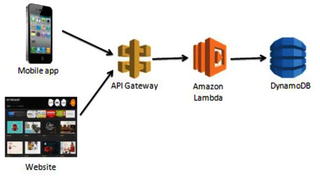
Figure
1-1.
A request is made to the API Gateway, which
then triggers the Lambda function for a response
In this example, a request to the
API Gateway is made from a mobile or web
application. API Gateway is Amazon’s API service that allows you to
quickly and easily make RESTful HTTP requests. The API Gateway has
the specific Lambda function created to handle this method set as
an integration point. The Lambda function is configured to receive
events from the API Gateway. When the request is made, the Amazon
Lambda function is triggered and executes.
An example use case of this could be a
movie database. A user clicks on an actor’s name in an application.
This click creates a GET request in the API Gateway, which is
pre-established to trigger the Lambda function for retrieving a
list of movies associated with a particular actor/actress. The
Lambda function retrieves this list from DynamoDB and returns it to
the application.
Another important point you can see
from this example is that the Lambda function is created to handle
a single piece of the overall application. Let’s say the
application also allows users to update the database with new
information. In a serverless architecture, you would want to create
a separate Lambda function to handle this. The purpose behind this
separation is to keep functions specific to a single event. This
keeps them lightweight, scalable, and easy to refactor. We will
discuss this in more detail in a later section.
Functions as a Service (FaaS)
As mentioned earlier, serverless
computing is a cloud computing model in which code is run as a
service without the need for the user to maintain or create the
underlying infrastructure. This doesn’t mean that serverless
architecture doesn’t require servers, but instead that a third
party is managing these servers so they are abstracted away from
the user. A good way to think of this is as “Functions as a
Service” (FaaS). Custom event-driven code
is created by the developer and run on stateless, ephemeral
containers created and maintained by a third party.
FaaS is often how serverless
technology is described, so it is good to study the concept in a
little more detail. You may have also heard about IaaS
(infrastructure as a service), PaaS
(platform as a service), and SaaS
(software as a service) as cloud computing service models.
IaaS
provides you with computing
infrastructure, physical or virtual machines and other resources
like virtual-machine disk image library, block, and file-based
storage, firewalls, load balancers, IP addresses, and virtual local
area networks. An example of this is an Amazon Elastic Compute Cloud (EC2) instance. PaaS
provides you with computing platforms which typically includes the
operating system, programming language execution environment,
database, and web server. Some examples include AWS Elastic
Beanstalk, Azure Web Apps, and Heroku. SaaS provides you with
access to application software. The installation and setup are
removed from the process and you are left with the application.
Some examples of this include Salesforce and Workday.
Uniquely, FaaS entails running
back-end code without the task of developing and deploying your own
server applications and server systems. All of this is handled by a
third-party provider. We will discuss this later in this
section.
Figure 1-2 illustrates the key
differences between the architectural
trends we have discussed.
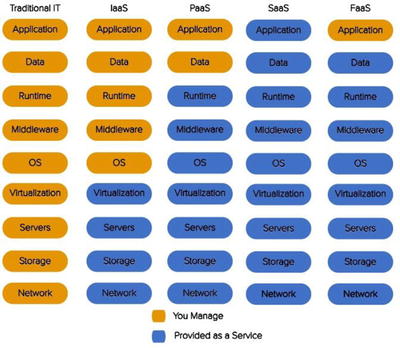
Figure
1-2.
What the developer manages compared to what the provider manages in different
architectural systems
How Does Serverless Computing Work?
We know that serverless computing is
event-driven FaaS, but how does it work from the vantage point of a
cloud provider? How are servers provisioned, auto-scaled, and
located to make FaaS perform? A point of misunderstanding is to
think that serverless computing doesn’t require servers. This is
actually incorrect. Serverless functions still run on servers; the
difference is that a third party is managing them instead of the
developer. To explain this, we will use an example of a traditional
three-tier system with server-side logic and show how it would be
different using serverless architecture.
Let’s say we have a website where we
can search for and purchase textbooks. In a traditional
architecture, you might have a client, a load-balanced server, and
a database for textbooks.
Figure 1-3 illustrates this
traditional architecture for an online
textbook store.

Figure
1-3.
The configuration of a traditional
architecture in which the server is provisioned and managed by the
developer
In a serverless architecture, several
things can change including the server and the database. An example
of this change would be creating a cloud-provisioned API and
mapping specific method requests to different functions. Instead of
having one server, our application now has functions for each piece
of functionality and cloud-provisioned servers that are created
based on demand. We could have a function for searching for a book,
and also a function for purchasing a book. We also might choose to
split our database into two separate databases that correspond to
the two functions.
Figure 1-4 illustrates a
serverless architecture for an online
textbook store.
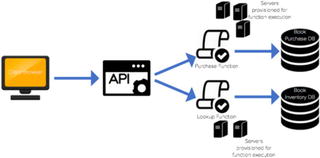
Figure
1-4.
The configuration
of a serverless architecture where servers are spun up and down
based on demand
There are a couple of differences
between the two architecture diagrams for the online book store.
One is that in the on-premises example ,
you have one server that needs to be load-balanced and auto-scaled
by the developer. In the cloud solution, the application is run in
stateless compute containers that are brought up and down by
triggered functions. Another difference is the separation of
services in the serverless example.
How Is It Different?
How is serverless computing different
from spinning up servers and building infrastructure from the
ground up? We know that the major difference is relying on
third-party vendors to maintain your servers, but how does that
make a difference in your overall application and development
process? The main two differences you are likely to see are in the
development of applications and the independent processes that are
used to create them.
Development
The development
process for serverless applications changes slightly from
the way one would develop a system on premises. Aspects of the
development environment including IDEs, source control, versioning,
and deployment options can all be established by the developer
either on premises or with the cloud provider. A preferred method
of continuous development includes writing serverless functions
using an IDE, such as Visual Studio, Eclipse, and IntelliJ, and
deploying it in small pieces to the cloud provider using the cloud
provider’s command-line interface. If the functions are small
enough, they can be developed within the actual cloud provider’s
portal. We will walk through the uploading process in the later
chapters to give you a feel for the difference between development
environments as well as the difference in providers. However, most
have a limit on function size before requiring a zip upload of the
project.
The command-line
interface (CLI) is a powerful
development tool because it makes serverless functions and their
necessary services easily deployable and allows you to continue
using the development tools you want to use to write and produce
your code. The Serverless Framework tool is another development
option that can be installed using NPM, as you will see in greater
detail later in the chapter.
Independent Processes
Another way to think of serverless
functions is as serverless microservices. Each function serves its
own purpose and completes a process independently of other
functions. Serverless computing is stateless and event-based, so
this is how the functions should be developed as well. For
instance, in a traditional architecture with basic API CRUD
operations (GET, POST, PUT, DELETE), you might have object-based
models with these methods defined on each object. The idea of
maintaining modularity still applies in the serverless level. Each
function could represent one API method and perform one process.
Serverless Framework helps with this, as it enforces smaller
functions which will help focus your code and keep it
modular.
Functions should be lightweight,
scalable, and should serve a single purpose. To help explain why
the idea of independent processes is preferred, we will look at
different architectural styles and the changes that have been made
to them over time. Figure 1-5 illustrates the design of a monolithic
architecture.
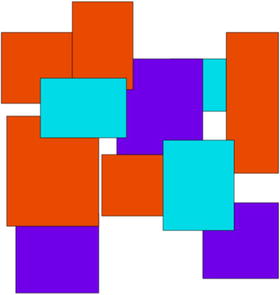
Figure
1-5.
This figure demonstrates the dependency
each functionally distinct aspect of the system has on
another
A monolithic application is built as a
single interwoven unit with a server-side application that handles
all requests and logic associated with the application. There are
several concerns with this architecture model. A concern during the
development period might be that no developer has a complete
understanding of the system, because all of the functionality is
packaged into one unit. Some other concerns include inability to
scale, limited re-use, and difficulty in repeated deployment.
The microservices approach breaks away
from the monolithic architecture pattern by separating services
into independent components that are created, deployed, and
maintained apart from one another. Figure 1-6 illustrates the
microservices architecture.

Figure
1-6.
This figure demonstrates the independent
services that make up a microservices architecture
Many of the concerns that we saw with
the monolithic approach are addressed through this solution.
Services are built as individual
components with a single purpose. This enables the application to
be consumed and used by other services more easily and efficiently.
It also enables better scalability as you can choose which services
to scale up or down without having to scale the entire system.
Additionally, spreading functionality across a wide range of
services decreases the chance of having a single point of failure
within your code. These microservices are also quicker to build and
deploy since you can do this independently without building the
entire application. This makes the development time quicker and
more efficient, and also allows for faster and easier development
and testing.
Benefits and Use Cases
One thing many developers and large
businesses struggle with about serverless architecture is giving
cloud providers complete control over the platform of your service.
However, there are many reasons and use cases that make this a good
decision that can benefit the overall outcome of a solution. Some
of the benefits include these:
-
Rapid development and deployment
-
Ease of use
-
Lower cost
-
Enhanced scalability
-
No maintenance of infrastructure
Rapid Development and Deployment
Since all of the infrastructure , maintenance, and autoscaling are
handled by the cloud provider, the development time is much quicker
and deployment easier than before. The developer is responsible
only for the application itself, removing the need to plan for time
to be spent on server setup. AWS, Azure, and Google also all
provide function templates that can be used to create an executable
function immediately.
Deployment also becomes a lot simpler,
thus making it a faster process. These cloud providers have
built-in versioning and aliasing for developers to use to work and
deploy in different environments.
Ease of Use
One of the greater benefits in implementing a serverless
solution is its ease of use. There is little ramp-up time needed to
begin programming for a serverless application. Most of this
simplicity is thanks to services, provided by cloud providers, that
make it easier to implement complete solutions. The triggers that
are necessary to execute your function are easily created and
provisioned within the cloud environment, and little maintenance is
needed.
Looking at our event-driven example
from earlier, the API gateway is completely managed by AWS but is
easily created and established as a trigger for the Lambda function
in no time. Testing, logging, and versioning are all possibilities
with serverless technology and they are all managed by the cloud
provider. These built in features and services allow the developer
to focus on the code and outcome of the application.
Lower Cost
For serverless solutions , you are charged per execution rather
than the existence of the entire applications. This means you are
paying for exactly what you’re using. Additionally, since the
servers of the application are being managed and autoscaled by a
cloud provider, they also come at a cheaper price than what you
would pay in house. Table 1-1 gives you a breakdown of the cost of
serverless solutions across different providers.
Table
1-1.
Prices for Function Executions by Cloud
Provider as of Publication
|
AWS Lambda
|
Azure Functions
|
Google Cloud Functions
|
|---|---|---|
|
First million requests a month free
|
First million requests a month free
|
First 2 million requests a month free
|
|
$0.20 per million requests afterwards
|
$0.20 per million requests afterwards
|
$0.40 per million requests afterwards
|
|
$0.00001667 for every GB-second used
|
$0.000016 for every GB-second used
|
$0.000025 for every GB-second used
|
Enhanced Scalability
With serverless solutions, scalability is automatically built-in because the
servers are managed by third-party providers. This means the time,
money, and analysis usually given to setting up auto-scaling and
balancing are wiped away. In addition to scalability, availability
is also increased as cloud providers maintain compute capacity
across availability zones and regions. This makes your serverless
application secure and available as it protects the code from
regional failures. Figure 1-7 illustrates the regions and zones for cloud
providers.
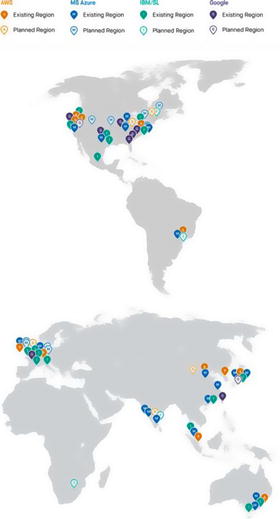
Figure
1-7.
This figure, from blog.fugue.co,
demonstrates the widespread availability of serverless functions
across cloud providers
Cloud providers take care of the
administration needed for the compute
resources. This includes servers, operating systems, patching,
logging, monitoring, and automatic scaling and provisioning.
Netflix Case Study with AWS
Netflix , a
leader in video streaming services with new technology, went with a
serverless architecture to automate the encoding process of media
files, the validation of backup completions and instance
deployments at scale, and the monitoring of AWS resources used by
the organization.
To apply this, Netflix created
triggering events to their Lambda functions that synchronized
actions in production to the disaster recovery site. They also made
improvements in automation with their dashboards and production
monitoring. Netflix accomplished this by using the triggering events to prove the configuration was
actually applicable.
Limits to Serverless Computing
Like most things, serverless
architecture has its limits. As important as it is to recognize
when to use serverless computing and how to implement it, it is
equally important to realize the drawbacks to implementing
serverless solutions and to be able to address these concerns ahead
of time. Some of these limits include
-
You want control of your infrastructure.
-
You’re designing for a long-running server application.
-
You want to avoid vendor lock-in.
-
You are worried about the effect of “cold start.”
-
You want to implement a shared infrastructure.
-
There are a limited number of out-of-the-box tools to test and deploy locally.
We will look at options to address all
of these issues shortly. Uniquely, FaaS entails running back-end
code without the task of developing and deploying your own server
applications and server systems. All of this is handled by a
third-party provider.
Control of Infrastructure
A potential
limit for going with a serverless architecture is the need to
control infrastructure. While cloud providers do maintain control
and provisioning of the infrastructure and OS, this does not mean
developers lose the ability to determine pieces of the
infrastructure.
Within each cloud provider’s function
portal, users have the ability to choose the runtime, memory,
permissions, and timeout. In this way the developer still has
control without the maintenance.
Long-Running Server Application
One of the benefits of serverless
architectures is that they are built to be fast, scalable,
event-driven functions. Therefore, long-running batch operations
are not well suited for this architecture. Most cloud providers
have a timeout period of five minutes, so any process that takes
longer than this allocated time is terminated. The idea is to move
away from batch processing and into real-time, quick, responsive
functionality.
If there is a need to move away from
batch processing and a will to do so, serverless architecture is a
good way to accomplish this. Let’s take a look at an example. Say
we work for a travel insurance company and we have a system that
sends a batch of all flights for the day to an application that
monitors them and lets the business know when a flight is delayed
or cancelled. Figure 1-8 illustrates this application.

Figure
1-8.
The configuration of a flight monitoring
application relying on batch jobs
To modify this to process and monitor
flights in real time, we can implement a serverless solution.
Figure 1-9
illustrates the architecture of this solution and how we were able
to convert this long-running server application to an event-driven,
real-time application.
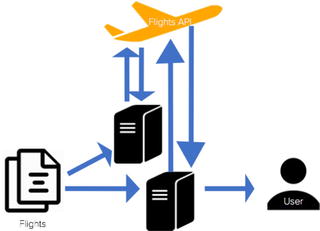
Figure
1-9.
The configuration of a flight monitoring
application that uses functions and an API trigger to monitor and
update flights
This real-time solution is preferable for a couple of reasons.
One, imagine you receive a flight you want monitored after the
batch job of the day has been executed. This flight would be
neglected in the monitoring system. Another reason you might want
to make this change is to be able to process these flights quicker.
At any hour of the day that the batch process could be occurring, a
flight could be taking off, therefore also being neglected from the
monitoring system. While in this case it makes sense to move from
batch to serverless, there are other situations where batch
processing is preferred.
Vendor Lock-In
One of the greatest fears with making
the move to serverless technology is that of vendor lock-in. This
is a common fear with any move to cloud technology. Companies worry
that by committing to using Lambda, they are committing to AWS and
either will not be able to move to another cloud provider or will
not be able to afford another transition to a cloud provider.
While this is understandable, there
are many ways to develop applications to make a vendor switch using
functions more easily. A popular and preferred strategy is to pull
the cloud provider logic out of the handler files so it can easily
be switched to another provider. Listing 1-1 illustrates a poor
example of abstracting cloud provider logic, provided by
serverlessframework.com.
const db = require('db').connect();
const mailer = require('mailer');
module.exports.saveUser = (event, context,
callback) => {
const user = {
email: event.email,
created_at: Date.now()
}
db.saveUser(user, function (err)
{
if (err) {
callback(err);
} else {
mailer.sendWelcomeEmail(event.email);
callback();
}
});
};
Listing
1-1.
A handler file for a function that includes
all of the database logic bound to the FaaS provider (AWS in this
case)
The code in Listing 1-2 illustrates a better
example of abstracting the cloud provider logic, also provided by
serverlessframework.com.
class Users {
constructor(db, mailer) {
this.db = db;
this.mailer = mailer;
}
save(email, callback) {
const user = {
email: email,
created_at:
Date.now()
}
this.db.saveUser(user, function
(err) {
if (err) {
callback(err);
} else {
this.mailer.sendWelcomeEmail(email);
callback();
}
});
}
}
module.exports = Users;
const db = require('db').connect();
const mailer = require('mailer');
const Users = require('users');
let users = new Users(db, mailer);
module.exports.saveUser = (event, context,
callback) => {
users.save(event.email,
callback);
};
Listing
1-2.
A handler file that is abstracted away from
the FaaS provider logic by creating a separate Users class
The second method is preferable both for avoiding vendor
lock-in and for testing. Removing the cloud provider logic from the
event handler makes the application more flexible and applicable to
many providers. It also makes testing easier by allowing you to
write traditional unit tests to ensure it is working properly. You
can also write integration tests to verify that integrations with
other services are working properly.
“Cold Start”
The concern about a “cold start” is
that a function takes slightly longer to respond to an event after
a period of inactivity. This does tend to happen, but there are
ways around the cold start if you need an immediately responsive
function. If you know your function will only be triggered
periodically, an approach to overcoming the cold
start is to establish a scheduler that calls your function
to wake it up every so often.
In AWS, this option is CloudWatch. You
can set scheduled events to occur every so often so that your
function doesn’t encounter cold starts. Azure and Google also have
this ability with timer triggers. Google does not have a direct
scheduler for Cloud functions, but it is possible to make one using
App Engine Cron, which triggers a topic with a function
subscription. Figure 1-10 illustrates the Google solution for
scheduling trigger events.
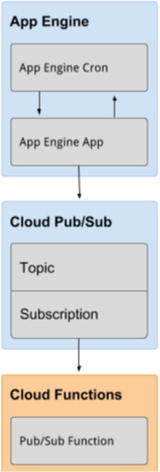
Figure
1-10.
This diagram from Google Cloud demonstrates
the configuration of a scheduled trigger event using App engine’s
Cron, Topic, and Cloud functions
An important point to note about the
cold start problem is that it is actually affected by runtime and
memory size. C# and Java have much greater cold start latency than
runtimes like Python and Node.js. In addition, memory size
increases the cold start linearly (the more memory you’re using,
the longer it will take to start up). This is important to keep in
mind as you set up and configure your serverless functions.
Shared Infrastructure
Because the benefits of serverless architecture rely on the provider’s
ability to host and maintain the infrastructure and hardware, some
of the costs of serverless applications also reside in this
service. This can also be a concern from a business perspective,
since serverless functions can run alongside one another regardless
of business ownership (Netflix could be hosted on the same servers
as the future Disney streaming service). Although this doesn’t
affect the code, it does mean the same availability and scalability
will be provided across competitors.
Limited Number of Testing Tools
One of the limitations to the growth
of serverless architectures is the limited number of testing and
deployment tools. This is anticipated to change as the serverless
field grows, and there are already some up-and-coming tools that
have helped with deployment. I anticipate that cloud providers will
start offering ways to test serverless applications locally as
services. Azure has already made some moves in this direction, and
AWS has been expanding on this as well. NPM has released a couple
of testing tools so you can test locally without deploying to your
provider. Some of these tools include node- lambda and
aws-lambda-local
. One of my current favorite deployment tools is the Serverless
Framework deployment tool. It is compatible with AWS, Azure,
Google, and IBM. I like it because it makes configuring and
deploying your function to your given provider incredibly easy,
which also contributes to a more rapid development time.
Serverless Framework, not to be
confused with serverless architecture, is an open source
application framework that lets you easily build serverless
architectures. This framework allows you to deploy auto-scaling,
pay-per-execution, event-driven functions to AWS, Azure, Google
Cloud, and IBM’s OpenWhisk. The benefits to using the Serverless
Framework to deploy your work include
-
Fast deployment: You can provision and deploy quickly using a few lines of code in the terminal.
-
Scalability: You can react to billions of events on Serverless Framework; and you can deploy other cloud services that might interact with your functions (this includes trigger events that are necessary to execute your function).
-
Simplicity: The easy-to-manage serverless architecture is contained within one yml file that the framework provides out of the box.
-
Collaboration: Code and projects can be managed across teams.
Table 1-2 illustrates the
differences between deployment with Serverless Framework and manual
deployment.
Table
1-2.
Comparing the configuration of a scheduled
trigger event using App engine Cron, Topic, and Cloud functions in
a serverless and a manual deployment
|
Function
|
Serverless vs Manual Deployment
|
|
|---|---|---|
|
Serverless Framework
|
Manual Deployment
|
|
|
Cron
|
Security out of the box
|
Security built independently
|
|
Topic
|
Automatic creation of services
|
Services built independently
|
|
Cloud
|
Reproduction resources created
Pre-formatted deployment scripts
|
Reproduction resources have to be created
separately
Write custom scripts to deploy
function
|
The figure gives you a good overview
of the Serverless Framework and the benefits to using it. We will
get some hands-on experience with Serverless later, so let’s look
into how it works. First, Serverless is installed using NPM (node
package manager) in your working directory. NPM unpacks Serverless
and creates a serverless.yml file in
the project folder. This file is where you define your various
services (functions), their triggers, configurations, and security.
For each cloud provider, when the project is deployed, compressed
files of the functions’ code are uploaded to object storage. Any
extra resources that were defined are added to a template specific
to the provider (CloudFormation for AWS, Google Deployment Manager
for Google, and Azure Resource Manager for Azure). Each deployment
publishes a new version for each of the functions in your service.
Figure 1-11
illustrates the serverless deployment for an AWS Lambda function.
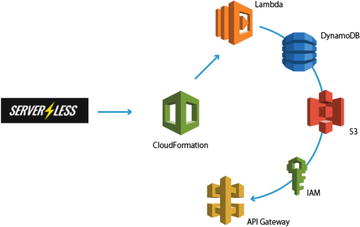
Figure
1-11.
This figure demonstrates how Serverless
deploys an application using CloudFormation, which then builds out
the rest of the services in the configured project
Serverless Platform is one of the leading development and
testing tools for serverless architecture. As serverless technology
progresses, more tools will come to light both within the cloud
provider’s interfaces and outside.
Conclusion
In this chapter you learned about
serverless applications and architecture, the benefits and use
cases, and the limits to using the serverless approach. It is
important to understand serverless architecture and what it
encompasses before designing an application that relies on it.
Serverless computing is an event-driven, functions-as-a-service
(FaaS) technology that utilizes third-party technology and servers
to remove the problem of having to build and maintain
infrastructure to create an application. The next chapter will
discuss the differences between the three providers we’re exploring
(AWS, Azure, Google), development options, and how to set up your
environment.